
” Resetting a Centos Forgotten Password”
Although passwords must be kept safe but in case of losing linux’s password a simple procedure can be followed to log in without password in order to change it.
Simply follow the steps:
1. During boot at the screen where you are prompted to press any key. Press a key to come to the following menu

2. Pressing Enter will open another menu as given below highlight the kernel option and press ‘e’
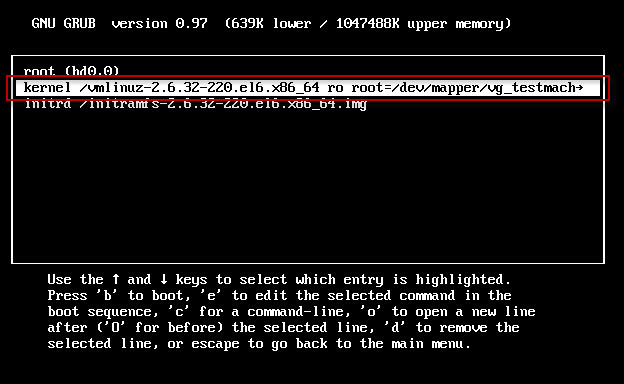
3. On the next menu simply insert “type single” or “init 1” in the next line or after a space in the given line as shown below.

4. Pressing enter will take you back to the 2nd menu and simply press ” b ” which will boot the linux Centos into “single user mode”
5. Type passwd
### Shell Commands ###
passwd
Enter new UNIX password:
Retype new UNIX password:
passwd: password updated successfully
6. Now you are all done.